Guides · October 21, 2026 · 6 min read
3D ticket draw on the big screen: a sphere of tickets or a lucky tree instead of a raffle box
A paper raffle box has real charm: a guest walks up, reaches in, and the whole room holds its breath while a name is read out. Preparing slips for a few hundred people, worrying about duplicates and folded tickets, then reading handwriting under stage lights is less charming. The 3D ticket draw keeps the gesture and drops the paperwork: a sphere or a tree carrying hundreds of face-down tickets turns slowly on screen, a guest pulls one out, the string stretches and snaps, and the ticket flies out and flips over to show the winner.
What is a 3D ticket draw?
The screen shows a slowly turning 3D pool of 40 to 240 face-down tickets. When a ticket is drawn it is pulled away from the pool, the string holding it stretches until it tears, and the ticket flies toward the audience, flips and reveals the winner’s name and code. One draw can pull one ticket or several, up to ten.
Two shapes are available: the Sphere, tickets lying flat across a globe, for galas, conferences and Halloween; and the Lucky Tree, red envelopes hanging from branches like a Tết blossom tree, where pulling one bends the branch before it springs back. Ticket colour, border colour, the label printed on each ticket and the ticket count are all editable in the designer.
How is it different from a number draw?
- Number draw: digits spin and stop. Fast, built for large lists and many rounds in a row.
- 3D ticket draw: there is a physical pull, so you can invite a guest, an executive or the previous winner on stage to draw with their own hand. Best for year-end parties, galas, Lunar New Year and Halloween — moments that need theatre more than speed.
- Everything else is identical to the number draw: the same participant list, prize tiers, absent-and-redraw, result export and phone remote.
Who picks the winner? The server, not the hand
Tickets on the pool belong to nobody. Only when a ticket leaves the pool does the server pick one remaining participant at random and print that name on the ticket as it flies out. The person pulling can choose any ticket they like but cannot choose a person. It keeps the spirit of a paper raffle — everyone sees the ticket drawn in front of them — without thick and thin slips.
Every draw is logged with time, prize and winner; mark absentees and redraw, then export the file at the end. Our guide on transparent draws explains the picking mechanism in more detail.
Two ways to draw: the host presses, or a guest pulls
- The host presses DRAW A TICKET, the Space key, or a button on their phone with the remote: the machine chooses a ticket, pulls it out, the string stretches and snaps.
- A guest pulls: press and hold a ticket on the front of the pool and drag it away. The string tightens and the ticket gets harder to move; keep pulling until the string tears and the ticket flies out with a name.
- Slip-ups are free: let go early and the ticket springs back with no draw spent. An accidental mouse flick does not tear a ticket either — the string only breaks when you pull and hold.
- A tap on a ticket without dragging only lifts it briefly before it springs back — no draw is spent; dragging on empty space rotates the pool so a guest can pick an angle.
- A stretching sound and a snap play on the way out; both can be turned off in the designer’s sound settings.
Will it run on a weak projector PC?
The pool is drawn by the browser (a recent Chrome or Edge) on the computer connected to the projector; nothing to install. If the machine is slow or cannot use 3D, the stage switches to a flat 2D pool by itself: it still turns and tickets still pull out, just with less shine. Do open the stage on the actual hall computer beforehand, close other tabs and background software before the game starts.
Seven ready-made templates
The first three were designed for the 3D draw alone: the ticket pool stands centre stage with a short headline above and the draw button below. The other four come with a prize wheel and a number draw in the same style, so switching game type mid-event keeps the look of the party.
 Try Spotlight stage — a sphere under the spotlight
 Try Neon pulse — a sphere inside neon rings
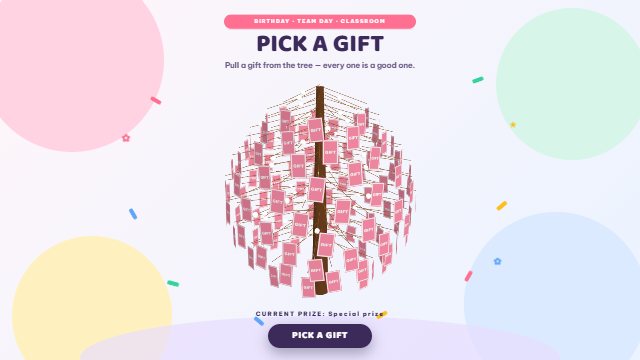 Try Cotton candy party — a gift tree on a light background
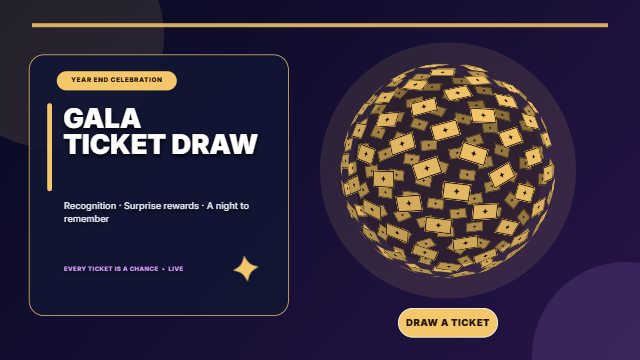 Try Golden gala — the golden sphere
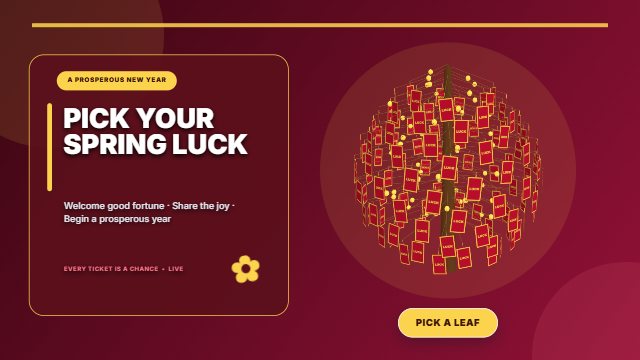 Try Spring fortune — the lucky tree
 Try Halloween Trick or Treat — the candy sphere
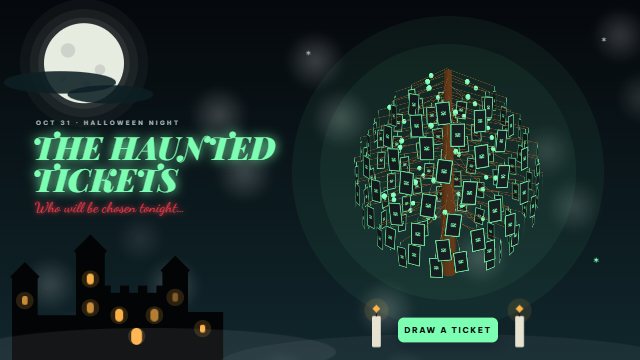 Try Halloween Haunted Castle — the haunted tree
Ten minutes to set up
- Create an event, pick the 3D ticket draw, then choose a template at the design step.
- Import the list from Excel or type it in; set prize tiers and how many tickets each draw pulls (one for the grand prize, several for small gifts).
- In the designer: change the title and logo, the ticket count, colours and label; choose the sphere or the tree.
- Publish, open the stage on the hall computer, run one practice draw to get the feel, then reset the results before the game.